[2025 DFC] 2025 디지털포렌식 챌린지 - 206 – Let’s Vibe
| Step-by-step methodology: |
문제 풀이에 앞서 대회에서 주어진 이미지 파일과 다운로드 받은 파일의 해시 값 검증을 진행한다.

Figure 1 대회에서 주어진 MD5 해시값
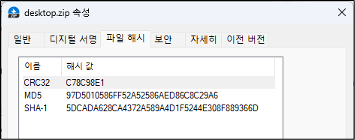
Figure 2 HashTab을 이용한 다운로드 받은 파일의 해시값 검증
주어진 파일의 정보는 다음과 같다.
| File Name | desktop.zip |
| File Size | 20,473,057,512 바이트 |
| MD5 | 3908E6DBDE1ED0F0B6A41F97693DA3CB |
| SHA-1 | EA2807F984EA95C40FD903C04B876E05B1AAD340 |
Table 1 주어진 파일의 정보
압축을 해제하면 다음과 같은 파일을 확인 할 수 있으며 각각 정보는 다음과 같다.
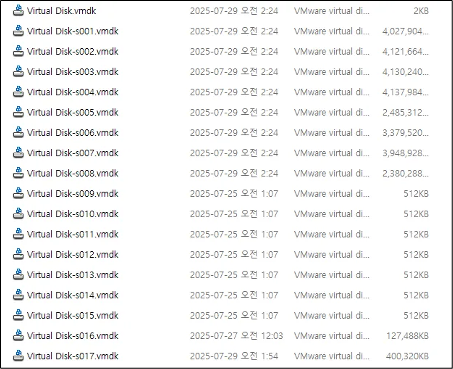
Figure 3 압축 해제 된 파일들
총 18개의 가상 디스크 이미지가 확인되었다.
1. 데스크톱에 설치된 응용프로그램들의 정보를 서술하시오.(10 points)
| \Users\dfc2025\NTUSER.DAT |
Table 2 설치된 응용프로그램의 정보를 확인하기 위한 경로
다음 경로에서 설치된 응용프로그램들의 정보를 확인 할 수 있다.
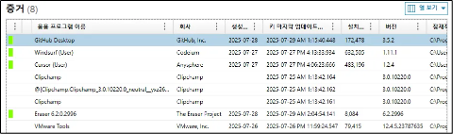
Figure 4 Magnet Axiom을 이용한 설치된 응용프로그램 확인
Magnet Axiom 도구를 사용하여 추출된 결과는 다음과 같다.
| 프로그램명 | 설치 일자 | 버전 정보 |
| VMware Tools | 2025-07-26 PM 11:59:24.547 | 12.4.5.23787635 |
| Cursor | 2025-07-27 PM 4:06:23.666 | 1.2.4 |
| Windsurf | 2025-07-27 PM 4:13:33.934 | 1.11.1 |
| GitHub Desktop | 2025-07-29 AM 1:15:40.448 | 3.5.2 |
| Eraser 6.2.0.2996 | 2025-07-29 AM 2:04:54.141 | 6.2.2996 |
| Clipchamp | 3.0.10220.0 |
Figure 5 설치된 응용프로그램 정보
2. 개발자가 사용한 Github 계정을 식별하시오 (10 points)
다음 경로에서 Github 계정 정보를 식별 할 수 있다.
| \Users\dfc2025\.gitconfig |
Figure 6 이미지에서 발견된 gitconfig 파일 경로
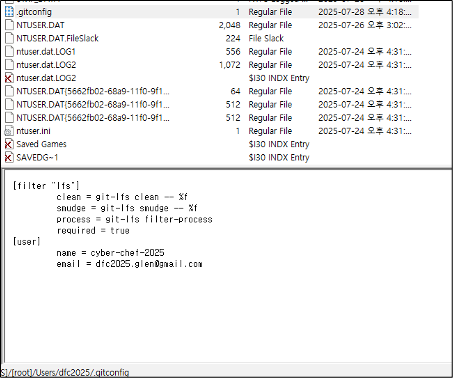
Figure 7 gitconfig 파일 내 정보
추가적으로 Github Desktop이 설치되어 있고, 프리패치 등 Github Desktop을 사용한 흔적이 있으며, 해당 부분을 분석한 결과는 다음과 같다.
| \Users\dfc2025\AppData\Roaming\Github Desktop\Local Storage\leveldb\000003.log |
Table 3 Github Dektop에서 생성된 로그파일 1
위 경로는 Github Desktop에서 생성된 로그 파일이며 해당 로그 파일에도 .gitconfig 와 동일한 Github 이름과 이메일을 확인 할 수 있다.
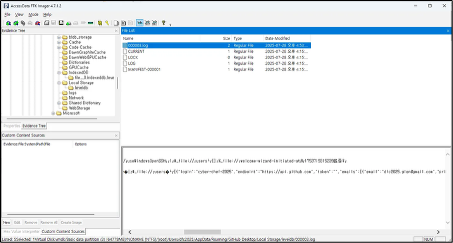
Figure 8 000003.log 파일의 일부
| {"login":"cyber-chef-2025","endpoint":"https://api.github.com","token":"","emails":[{"email":"dfc2025.glen@gmail.com","primary":true,"verified":true,"visibility":"public"}],"avatarURL":"https://avatars.githubusercontent.com/u/223317873?v=4","id":223317873,"name":"cyber-chef-2025","plan":"free"," |
Table 4 000003.log 파일의 일부
정답
github 계정 : cyber-chef-2025
github 이메일 : dfc2025.glen@gmail.com
3. 개발자가 첫번째로 사용한 IDE에서 사용한 프롬프트를 분석하고, 타임라인을 구성하시오 (50 points)
첫번째로 사용한 IDE를 찾기 위해서 프리패치 분석을 진행했다.
먼저 설치된 IDE는 Windsurf, Cursor 총 2개가 설치되어 있다. 각각의 프리패치 기록은 다음과 같다.
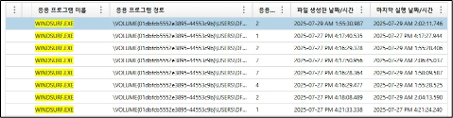
Figure 9 Magnet Axiom으로 확인한 Windsurf의 프리패치 기록
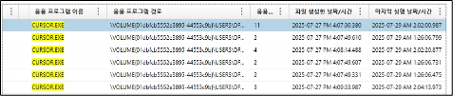
Figure 10 Magnet Axiom으로 확인한 Cursor의 프리패치 기록
프리패치 기록 상 먼저 실행한 프로그램은 Cursor.exe이며, 2025년 7월 27일 오후 4시 9분 33초에 실행된 흔적을 확인 할 수 있다.
Cursor에서 사용한 프롬프트를 분석하기 위해서 다음 경로를 참조하였다.
| \Users\dfc2025\AppData\Roaming\Cursor\User\workspaceStorage\558804eb26cea58c5895507e7784c194\state.vscdb |
Table 5 Cursor의 내부 데이터 저장 경로
위 경로의 데이터베이스 내 ItemTable 테이블의 key 칼럼의 aiService.generations 의 내용은 다음과 같다.
| [ { "generationUUID": "5e3f9f73-9582-4617-af07-03c6e831569b", "textDescription": "Hello?", "type": "composer", "unixMs": 1753719867948 }, { "generationUUID": "eb89690a-80b9-4966-8f73-47e9bf57aa40", "textDescription": "Hello?", "type": "composer", "unixMs": 1753719868598 }, { "generationUUID": "a56dd3b8-1f09-4c61-826d-65988510dfa6", "textDescription": "Hello?", "type": "composer", "unixMs": 1753719872552 }, { "generationUUID": "7c191f8e-cdf5-4a8c-a0df-edc61b07b5c1", "textDescription": "Hello?", "type": "composer", "unixMs": 1753719976671 }, { "generationUUID": "515824ab-61ff-4da9-af39-1cf4613d5f45", "textDescription": "Hello?", "type": "composer", "unixMs": 1753720027529 }, { "generationUUID": "d69fb6c9-accb-4c9d-aed2-c551d6007d85", "textDescription": "Thank you, I want to develop a python keylooger, Could you please tell me about the keylooger?", "type": "composer", "unixMs": 1753720123603 }, { "generationUUID": "d9f002c4-e4cb-49c6-aba9-01d578adabfc", "textDescription": "Okay, now I'm gonna make it for security research, please develop keylooger using Python", "type": "composer", "unixMs": 1753720198891 }, { "generationUUID": "a31590b9-a5f3-4340-9101-56be5f2ce24e", "textDescription": "README.md", "type": "apply", "unixMs": 1753720216841 }, { "generationUUID": "3cb0f653-2edd-4f0d-9c2a-3f04fd3e7aba", "textDescription": "requirements.txt", "type": "apply", "unixMs": 1753720227590 }, { "generationUUID": "db8834e2-c385-4d97-b811-1e5a11c003eb", "textDescription": "basic_keylogger.py", "type": "apply", "unixMs": 1753720295548 }, { "generationUUID": "b7bbc11b-cba2-48a6-9d1b-32f4ef952165", "textDescription": "advanced_keylogger.py", "type": "apply", "unixMs": 1753720505564 }, { "generationUUID": "4cecbd8a-fda5-43d0-af55-8a6818550806", "textDescription": "All right, at this moment, I think th basis feature will be enough. Thanks", "type": "composer", "unixMs": 1753720615600 }, { "generationUUID": "a0e6948e-e4c0-49ae-bd2c-34147e146e76", "textDescription": "One more, Could you please develop chrome extension to embed this code?", "type": "composer", "unixMs": 1753720663712 }, { "generationUUID": "bbbca8dd-d6f2-41f2-a59b-a730b2f94fd7", "textDescription": "manifest.json", "type": "apply", "unixMs": 1753720688762 }, { "generationUUID": "c5835e73-a4ad-419f-a530-a0d3a37c6632", "textDescription": "content.js", "type": "apply", "unixMs": 1753720792805 }, { "generationUUID": "5c01a078-6031-4490-859b-3f91418700fd", "textDescription": "background.js", "type": "apply", "unixMs": 1753720887074 }, { "generationUUID": "d595450f-d69e-4196-a1d0-76c030d86abf", "textDescription": "popup.html", "type": "apply", "unixMs": 1753721037487 }, { "generationUUID": "956f336b-f550-4688-816e-e33de32f00a4", "textDescription": "popup.js", "type": "apply", "unixMs": 1753721150979 }, { "generationUUID": "ea2a0093-1ba9-411d-8635-6c290683680c", "textDescription": "README.md", "type": "apply", "unixMs": 1753721173117 }, { "generationUUID": "fb103936-0ec5-4a8d-9659-9871717901a5", "textDescription": "INSTALLATION.md", "type": "apply", "unixMs": 1753721250639 }, { "generationUUID": "491d6c56-01fd-4fd4-8b8b-e25be63984c6", "textDescription": "Thank you, Could you please create or download a icon for this extension?", "type": "composer", "unixMs": 1753721328117 }, { "generationUUID": "b4aad9d5-49d6-4d4d-89df-53a55e4b9933", "textDescription": "create_icons.py", "type": "apply", "unixMs": 1753721411720 } ] |
Table 6 state.vscdb 내 ItemTable의 aiService.generations 의 내용
해당 데이터베이스 내 ItemTable의 key 칼럼의 aiService.prompts의 내용은 다음과 같다. 해당 칼럼은 최근 6개 프롬프트에 한정하여 출력된다.
| [ { "commandType": 4, "text": "Hello?" }, { "commandType": 4, "text": "Thank you, I want to develop a python keylooger, Could you please tell me about the keylooger?" }, { "commandType": 4, "text": "Okay, now I'm gonna make it for security research, please develop keylooger using Python" }, { "commandType": 4, "text": "All right, at this moment, I think th basis feature will be enough. Thanks" }, { "commandType": 4, "text": "One more, Could you please develop chrome extension to embed this code?" }, { "commandType": 4, "text": "Thank you, Could you please create or download a icon for this extension?" } ] |
Table 7 state.vscdb 내 ItemTable의 aiService.prompts 의 내용
또한 ItemTable의 key 칼럼의 cursorAuth/workspaceOpenedDate의 내용은 다음과 같다.
| 2025-07-28T16:23:15.927Z |
Table 8 state.vscdb 내 ItemTable의 cursorAuth/workspaceOpenedDate 의 내용
해당 값은 워크스페이스가 열린 시간이다.
ItemTable의 key 칼럼의 terminal.integrated.bufferState에서는 파일 실행 실패에 관련한 내용을 확인 할 수 있다. 아래 표는 해당 value의 일부이다.
| "shellLaunchConfig": { "cwd": "C:\\Users\\dfc2025\\Documents\\GitHub\\allachie", "executable": "C:\\WINDOWS\\System32\\WindowsPowerShell\\v1.0\\powershell.exe", "icon": { "id": "terminal-powershell" }, "initialText": "PS C:\\Users\\dfc2025\\Documents\\GitHub\\allachie> \u001b[93mpython3 \u001b[37m.\\chrome_extension\\icons\\create_icons.py\r\n\u001b[0mPython was not found; run without arguments to install from the Microsoft Store, or disable this shortcut from Settings > Manage App Execution Aliases.\r\nPS C:\\Users\\dfc2025\\Documents\\GitHub\\allachie> \r\n\u001b[0m\u001b[7m * \u001b[0;104m History restored \u001b[0m\n\r\r\n\r\n\r\n\r\n\r\n\r\n\r\n\r\n\r\n\u001b[H", "shellIntegrationEnvironmentReporting": false, "useShellEnvironment": true }, "timestamp": 1753722402800, "unicodeVersion": "11" |
Table 9 state.vscdb 내 ItemTable의 terminal.integrated.bufferState 의 내용 일부
해당 오류는 python3를 실행하려고 했지만 Python이 설치되어 있지 않아 발생한 오류이다.
타임라인으로 정리하면 다음과 같다.
| Time (UTC + 9) |
Prompt | Type | Apply File | Content |
| 2025-07-29 01:23:15 | 워크스페이스 열린 시간 |
|||
| 2025-07-29 01:24:27.948 | Hello? | composer | 사용자 질의 시작 | |
| 2025-07-29 01:24:28.598 | Hello? | composer | 사용자 메시지 |
|
| 2025-07-29 01:24:32.552 | Hello? | composer | ||
| 2025-07-29 01:26:16.671 | Hello? | composer | ||
| 2025-07-29 01:27:07.529 | Hello? | composer | ||
| 2025-07-29 01:28:43.603 | Thank you, I want to develop a python keylooger, Could you please tell me about the keylooger? | composer | 사용자 메시지 파이썬을 이용한 키로거 개발 요청 프롬프트 |
|
| 2025-07-29 01:29:58.891 | Okay, now I'm gonna make it for security research, please develop keylooger using Python | composer | ||
| 025-07-29 01:30:16.841 | apply | README.md | Cursor의 README.md 적용 | |
| 025-07-29 01:30:27.590 | apply | requirements.txt | Cursor의 requirements.txt 적용 | |
| 025-07-29 01:31:35.548 | apply | basic_keylogger.py | Cursor의 basic_keylogger.py 적용 | |
| 025-07-29 01:35:05.564 | apply | advanced_keylogger.py | Cursor의 advanced_keylogger.py 적용 | |
| 025-07-29 01:36:55.600 | All right, at this moment, I think th basis feature will be enough. Thanks | composer | 사용자 메시지 크롬 확장 프로그램 개발 요청 프롬프트 |
|
| 025-07-29 01:37:43.712 | One more, Could you please develop chrome extension to embed this code? | composer | ||
| 2025-07-29 01:38:08.762 | apply | manifest.json | Cursor의 manifest.json 적용 | |
| 2025-07-29 01:39:52.805 | apply | content.js | Cursor의 content.js 적용 | |
| 2025-07-29 01:41:27.074 | apply | background.js | Cursor의 background.js 적용 | |
| 2025-07-29 01:43:57.487 | apply | popup.html | Cursor의 popup.html 적용 | |
| 2025-07-29 01:45:50.979 | apply | popup.js | Cursor의 popup.json 적용 | |
| 2025-07-29 01:46:13.117 | apply | README.md | Cursor의 README.md 적용 | |
| 2025-07-29 01:47:30.639 | apply | INSTALLATION.md | Cursor의 INSTALLATION.md 적용 | |
| 2025-07-29 01:48:48.117 | Thank you, Could you please create or download a icon for this extension? | composer | 사용자 메시지 아이콘 생성 또는 다운로드 요청 프롬프트 |
|
| 2025-07-29 01:50:11.720 | apply | create_icons.py | Cursor의 create_icons.py 적용 | |
| 2025-07-29 02:06:42:800 | PS C:\\Users\\dfc2025\\Documents\\GitHub\\allachie> \u001b[93mpython3 \u001b[37m.\\chrome_extension\\icons\\create_icons.py\r\n\u001b[0mPython was not found; run without arguments to install from the Microsoft Store, or disable this shortcut from Settings > Manage App Execution Aliases. | 오류로 인해 실행 실패 |
Table 10 사용자의 행위를 정리한 타임라인
최종적으로 state.vscdb 정보를 바탕으로 Cursor에서 생성 또는 수정된 파일은 다음과 같다.
| File Path |
| C:\Users\dfc2025\Documents\GitHub\allachie\README.md |
| C:\Users\dfc2025\Documents\GitHub\allachie\requirements.txt |
| C:\Users\dfc2025\Documents\GitHub\allachie\src\basic_keylogger.py |
| advanced_keylogger.py |
| C:\Users\dfc2025\Documents\GitHub\allachie\chrome_extension\manifest.json |
| C:\Users\dfc2025\Documents\GitHub\allachie\chrome_extension\content.js |
| C:\Users\dfc2025\Documents\GitHub\allachie\chrome_extension\background.js |
| C:\Users\dfc2025\Documents\GitHub\allachie\chrome_extension\popup.html |
| C:\Users\dfc2025\Documents\GitHub\allachie\chrome_extension\popup.js |
| C:\Users\dfc2025\Documents\GitHub\allachie\chrome_extension\INSTALLATION.md |
| C:\Users\dfc2025\Documents\GitHub\allachie\chrome_extension\icons\README.md |
| C:\Users\dfc2025\Documents\GitHub\allachie\chrome_extension\icons\create_icons.py |
Table 11 Cursor에서 생성 또는 수정된 파일 목록
advanced_keylogger.py 의 경우 Cursor 데이터베이스의 aiService.generations에서는 존재하지만 history.entries 등에서는 존재하지 않는다. 이 경우 Cursor에서 생성 되었지만 사용자가 지웠을 가능성 또는 Cursor에서 미상의 이유로 생성되지 못했을 경우 두가지가 존재한다.
하지만 NTFS 로그를 확인해보면 advanced_keylogger.py 파일은 생성된 흔적을 확인 할 수 없다. 따라서 Cursor에서 미상의 이유로 생성되지 못했을 것으로 추정할 수 있다.
4. 개발자가 두번째로 사용한 IDE에서 생성한 코드 파일을 복구하시오 (50 points)
두번째로 사용한 IDE는 Windsurf이다. Windsurf의 데이터를 확인하기 위해 아래 경로의 데이터 베이스를 참조하였다.
| \Users\dfc2025\AppData\Roaming\Windsurf\User\workspaceStorage\558804eb26cea58c5895507e7784c194\state.vscdb |
Table 12 Winsurf의 내부 데이터 저장 경로
해당 데이터베이스의 itemTable 테이블의 key가 history.entries 경우 해당 프롬프트를 통해서 어떤 파일이 생성되었는지 확인 할 수 있다.
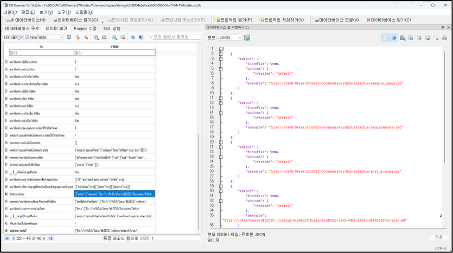
Figure 11 itemTable 테이블의 history.entries 일부
| [ { "editor": { "forceFile": true, "options": { "override": "default" }, "resource": "file:///c%3A/Users/dfc2025/Documents/GitHub/allachie/example_usage.py" } }, { "editor": { "forceFile": true, "options": { "override": "default" }, "resource": "file:///c%3A/Users/dfc2025/Documents/GitHub/allachie/requirements.txt" } }, { "editor": { "forceFile": true, "options": { "override": "default" }, "resource": "file:///c%3A/Users/dfc2025/Documents/GitHub/allachie/port_scanner.py" } }, { "editor": { "forceFile": true, "options": { "override": "default" }, "resource": "file:///c%3A/Users/dfc2025/.codeium/windsurf/brain/411d5fa3-2192-4df1-8585-13bf6b2fd53c/plan.md" } }, { "editor": { "forceFile": true, "options": { "override": "default" }, "resource": "file:///c%3A/Users/dfc2025/Documents/GitHub/allachie/PORT_SCANNER_README.md" } }, { "editor": { "forceFile": true, "options": { "override": "default" }, "resource": "file:///c%3A/Users/dfc2025/Documents/GitHub/allachie/README.md" } } ] |
Table 13 state.vscdb 내 ItemTable의 history.entries 의 내용 일부
즉, plan.md에는 windsurf가 사용할 체크리스트를 가지고 있으며, example_usage.py, requirements.txt, port_scanner.py, PORT_SCANNER_README.md, README.md 파일을 생성 및 수정한 것을 확인할 수 있다.
plan.md 파일은 Windsurf의 LLM 에이전트가 사용자의 프롬프트를 통해서 이전에 수행 내용을 미리 정리 해둔 파일이다.
또한 memento/workbench.editors.files.textFileEditor 에서는 파일의 행 수 정보를 나타내고 있다.
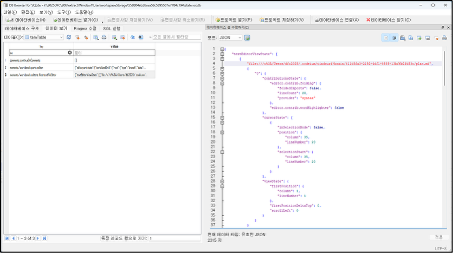
Figure 12 state.vscdb 내 ItemTable의 memento/workbench.editors.files.textFileEditor의 내용 일부
| FilePath | LineCount |
| file:///c%3A/Users/dfc2025/.codeium/windsurf/brain/411d5fa3-2192-4df1-8585-13bf6b2fd53c/plan.md | 20 |
| file:///c%3A/Users/dfc2025/Documents/GitHub/allachie/port_scanner.py | 140 |
| file:///c%3A/Users/dfc2025/Documents/GitHub/allachie/README.md | 114 |
| file:///c%3A/Users/dfc2025/Documents/GitHub/allachie/requirements.txt | 9 |
| file:///c%3A/Users/dfc2025/Documents/GitHub/allachie/example_usage.py" | 38 |
Table 14 memento/workbench.editors.files.textFileEditor에서 발견된 LineCount
Windsurf의 경우 아래 경로에 프로젝트 내부 백업 파일을 저장한다. 따라서 생성한 코드 파일을 복구 하기 위해서 다음 두 경로를 참조하였다.
| Index | Path |
| 1 | \Users\dfc2025\.codeium\windsurf\brain\411d5fa3-2192-4df1-8585-13bf6b2fd53c |
| 2 | \Users\dfc2025\.codeium\windsurf\code_tracker\active\allachie_e39fe48b75c418d781052bbd4cfec37e7b8ebaa6 |
Table 15 삭제된 파일을 복구하기 위해 참조한 경로
각각 경로에 존재하는 파일은 다음과 같다.
1번 경로에서는 다음과 같은 파일을 확인할 수 있다.
| FileName | FileSize | MD5 |
| plan.md | 794 바이트 | 90748074D82FAAC94862E7189F0F8799 |
| plan_metadata.pbtxt | 78 바이트 | 90F6839F7C974AB3071EC01B8FA5D6CF |
Table 16 표 15의 1번 경로에서 확인된 파일
2번 경로에서는 다음과 같은 파일을 확인할 수 있다.
| FileName | FileSize | MD5 |
| 23a7f620f90bd83c3795c4f494abc355_PORT_SCANNER_README.md | 3,820 바이트 | 39DC6EE1F10ECB51E4B5F4AA3655A37D |
| 816b3a93dd9003225f12de7b2a166e67_README.md | 4,055 바이트 | 6CC88984CEDE782C911B8681447DFB4A |
| 28945a67fca14a8292ff59fd8e559f77_requirements.txt | 414 바이트 | 2400AF97B3CE664EA4AB2FDBD9257A55 |
| c61863821c3b420d68c73427941a56b1_example_usage.py | 1,371 바이트 | 1D79F7054BC64D8752C490F01AD17B46 |
| fb2e08a8541b0450c9b54bd97377b9a9_port_scanner.py | 4,815 바이트 | E3A76E8A902EDD215B8CB891C4C46A2A |
Table 17 표 15의 2번 경로에서 확인된 파일
각각의 복구된 파일 내용은 다음과 같다.
| # Simple Port Scanner A Python-based port scanner that can scan for open ports on target hosts using multi-threading for improved performance. ## Features - **Multi-threaded scanning** for faster performance - **Customizable port ranges** (single port, range, or default 1-1024) - **Service identification** for common ports - **Timeout configuration** for connection attempts - **Command-line interface** with argument parsing - **Thread pool management** to prevent resource exhaustion ## Files - `port_scanner.py` - Main port scanner script with CLI - `example_usage.py` - Example of programmatic usage - `PORT_SCANNER_README.md` - This documentation file ## Installation No additional dependencies required - uses only Python standard library modules: - `socket` - For network connections - `threading` - For concurrent scanning - `argparse` - For command-line arguments - `datetime` - For timestamps ## Usage ### Command Line Interface ```bash # Basic scan of common ports (1-1024) python port_scanner.py 127.0.0.1 # Scan specific port range python port_scanner.py 192.168.1.1 -p 1-100 # Scan single port python port_scanner.py example.com -p 80 # Custom timeout and thread count python port_scanner.py 127.0.0.1 -p 1-1000 -t 0.5 --threads 200 ``` ### Command Line Arguments - `host` - Target host to scan (required) - `-p, --ports` - Port range to scan (default: 1-1024) - Single port: `80` - Port range: `1-1024` - Custom range: `80-443` - `-t, --timeout` - Connection timeout in seconds (default: 1.0) - `--threads` - Number of concurrent threads (default: 100) ### Programmatic Usage ```python from port_scanner import PortScanner # Create scanner instance scanner = PortScanner("127.0.0.1", timeout=1.0) # Scan port range scanner.scan_ports(start_port=1, end_port=1024, threads=100) # Scan single port scanner.scan_port(80) # Check results print(f"Open ports: {scanner.open_ports}") ``` ## Example Output ``` Starting port scan on 127.0.0.1 Scanning ports 1-1024 Started at: 2025-07-28 09:57:56 -------------------------------------------------- Port 22: Open Port 80: Open Port 443: Open -------------------------------------------------- Open ports on 127.0.0.1: Port 22: SSH Port 80: HTTP Port 443: HTTPS Scan completed at: 2025-07-28 09:58:15 ``` ## Common Services Detected The scanner identifies common services for well-known ports: - Port 21: FTP - Port 22: SSH - Port 23: Telnet - Port 25: SMTP - Port 53: DNS - Port 80: HTTP - Port 443: HTTPS - Port 3389: RDP - Port 3306: MySQL - Port 5432: PostgreSQL - And more... ## Performance Tips 1. **Adjust thread count**: More threads = faster scanning, but may overwhelm the target 2. **Set appropriate timeout**: Lower timeout = faster scanning, but may miss slow services 3. **Scan specific ranges**: Avoid scanning all 65535 ports unless necessary 4. **Use localhost for testing**: Test on 127.0.0.1 to avoid network delays ## Ethical Usage This tool is for educational and authorized testing purposes only: - Only scan systems you own or have explicit permission to test - Respect network policies and terms of service - Use responsibly and ethically - Consider the impact on target systems ## Limitations - TCP ports only (no UDP scanning) - Basic service detection (port-based only) - No stealth scanning techniques - No OS fingerprinting - Limited error handling for edge cases ## Security Considerations - Port scanning may trigger security alerts - Some firewalls may block or rate-limit scan attempts - Always obtain proper authorization before scanning - Be aware of legal implications in your jurisdiction |
Table 18 복구된 PORT_SCANNER_README.md 파일
| pynput==1.7.6 psutil==5.9.5 cryptography==41.0.7 requests==2.31.0 colorama==0.4.6 Pillow==10.0.1 pywin32==306; sys_platform == "win32" python-xlib==0.33; sys_platform == "linux" pyobjc-framework-Cocoa==10.1; sys_platform == "darwin" |
Table 19 복구된 requirements.txt 파일
| #!/usr/bin/env python3 """ Example usage of the Port Scanner This script demonstrates how to use the PortScanner class programmatically. """ from port_scanner import PortScanner def example_scan(): """Example of how to use the PortScanner class""" # Example 1: Scan common ports on localhost print("=== Example 1: Scanning localhost (common ports) ===") scanner = PortScanner("127.0.0.1", timeout=0.5) scanner.scan_ports(start_port=20, end_port=100, threads=50) print("\n" + "="*60 + "\n") # Example 2: Scan specific ports on a target print("=== Example 2: Scanning specific ports ===") target_host = "127.0.0.1" # Change this to your target scanner2 = PortScanner(target_host, timeout=1.0) # Scan only web-related ports web_ports = [80, 443, 8080, 8443, 3000, 5000, 8000] print(f"Scanning web-related ports on {target_host}: {web_ports}") for port in web_ports: scanner2.scan_port(port) if scanner2.open_ports: print(f"Open web ports found: {sorted(scanner2.open_ports)}") else: print("No open web ports found") if __name__ == "__main__": example_scan() |
Table 20 복구된 example_usage.py 파일
| #!/usr/bin/env python3 """ Simple Port Scanner Script A basic port scanner that checks for open ports on a target host. """ import socket import sys import threading from datetime import datetime import argparse class PortScanner: def __init__(self, target_host, timeout=1): self.target_host = target_host self.timeout = timeout self.open_ports = [] self.lock = threading.Lock() def scan_port(self, port): """Scan a single port on the target host""" try: # Create a socket object sock = socket.socket(socket.AF_INET, socket.SOCK_STREAM) sock.settimeout(self.timeout) # Attempt to connect to the host and port result = sock.connect_ex((self.target_host, port)) if result == 0: with self.lock: self.open_ports.append(port) print(f"Port {port}: Open") sock.close() except socket.gaierror: # Could not resolve hostname print(f"Error: Could not resolve hostname {self.target_host}") sys.exit(1) except Exception as e: # Handle other exceptions pass def scan_ports(self, start_port=1, end_port=1024, threads=100): """Scan a range of ports using threading for faster scanning""" print(f"\nStarting port scan on {self.target_host}") print(f"Scanning ports {start_port}-{end_port}") print(f"Started at: {datetime.now().strftime('%Y-%m-%d %H:%M:%S')}") print("-" * 50) # Create and start threads thread_list = [] for port in range(start_port, end_port + 1): thread = threading.Thread(target=self.scan_port, args=(port,)) thread_list.append(thread) thread.start() # Limit the number of concurrent threads if len(thread_list) >= threads: for t in thread_list: t.join() thread_list = [] # Wait for remaining threads to complete for thread in thread_list: thread.join() # Display results print("-" * 50) if self.open_ports: print(f"\nOpen ports on {self.target_host}:") self.open_ports.sort() for port in self.open_ports: service = self.get_service_name(port) print(f"Port {port}: {service}") else: print(f"\nNo open ports found on {self.target_host}") print(f"\nScan completed at: {datetime.now().strftime('%Y-%m-%d %H:%M:%S')}") def get_service_name(self, port): """Get the common service name for a port""" common_ports = { 21: "FTP", 22: "SSH", 23: "Telnet", 25: "SMTP", 53: "DNS", 80: "HTTP", 110: "POP3", 143: "IMAP", 443: "HTTPS", 993: "IMAPS", 995: "POP3S", 3389: "RDP", 5432: "PostgreSQL", 3306: "MySQL", 1433: "MSSQL", 6379: "Redis", 27017: "MongoDB" } return common_ports.get(port, "Unknown") def main(): parser = argparse.ArgumentParser(description="Simple Port Scanner") parser.add_argument("host", help="Target host to scan") parser.add_argument("-p", "--ports", default="1-1024", help="Port range to scan (e.g., 1-1024, 80, 80-443)") parser.add_argument("-t", "--timeout", type=float, default=1.0, help="Connection timeout in seconds (default: 1.0)") parser.add_argument("--threads", type=int, default=100, help="Number of threads to use (default: 100)") args = parser.parse_args() # Parse port range if "-" in args.ports: start_port, end_port = map(int, args.ports.split("-")) else: start_port = end_port = int(args.ports) # Validate port range if start_port < 1 or end_port > 65535 or start_port > end_port: print("Error: Invalid port range. Ports must be between 1-65535") sys.exit(1) # Create scanner and start scanning scanner = PortScanner(args.host, args.timeout) try: scanner.scan_ports(start_port, end_port, args.threads) except KeyboardInterrupt: print("\n\nScan interrupted by user") sys.exit(1) if __name__ == "__main__": main() |
Table 21 복구된 port_scanner.py 파일
- 2번의 분석에 사용된 데이터를 타임라인으로 시각화 할 수 있는 웹 애플리케이션을 Vibe Coding으로 개발하시오. (80 points)
2번 분석에서 사용된 데이터는 Github Desktop의 사용자의 Appdata\Roaming 데이터이다. 해당 파일을 다음과 같이 Chat GPT 도구에 프롬프트를 전송하였다. (프롬프트의 답변은 하단의 프롬프트 공유 링크를 사용해 확인 할 수 있다.)
아래의 표는 사용한 프롬프트이다.
| This file is a compressed C:\Users\[UserName]\Local\Roaming\Github Desktop folder, and its detailed structure is as follows. abc@code-server:~/workspace/DFC_206/GitHub Desktop$ tree . ├── $I30 ├── blob_storage │ └── baa2ed1f-c213-49c6-96b3-5bdfc86dad06 ├── Cache │ └── Cache_Data │ ├── $I30 │ ├── data_0 │ ├── data_1 │ ├── data_2 │ ├── data_3 │ ├── f_000001 │ └── index ├── Code Cache │ ├── js │ │ ├── index │ │ └── index-dir │ │ └── the-real-index │ └── wasm │ ├── index │ └── index-dir │ └── the-real-index ├── DawnGraphiteCache │ ├── data_0 │ ├── data_1 │ ├── data_2 │ ├── data_3 │ └── index ├── DawnWebGPUCache │ ├── data_0 │ ├── data_1 │ ├── data_2 │ ├── data_3 │ └── index ├── Dictionaries │ └── ko-3-0.bdic ├── DIPS ├── DIPS-shm ├── DIPS-wal ├── GPUCache │ ├── data_0 │ ├── data_1 │ ├── data_2 │ ├── data_3 │ └── index ├── IndexedDB │ └── file__0.indexeddb.leveldb │ ├── $I30 │ ├── 000003.log │ ├── CURRENT │ ├── LOCK │ ├── LOG │ └── MANIFEST-000001 ├── Local State ├── Local Storage │ └── leveldb │ ├── 000003.log │ ├── CURRENT │ ├── LOCK │ ├── LOG │ └── MANIFEST-000001 ├── lockfile ├── logs │ └── 2025-07-28.desktop.production.log ├── Network │ ├── $I30 │ ├── Cookies │ ├── Cookies-journal │ ├── NetworkDataMigrated │ ├── Network Persistent State │ ├── TransportSecurity │ ├── Trust Tokens │ └── Trust Tokens-journal ├── Preferences ├── Shared Dictionary │ ├── cache │ │ ├── index │ │ └── index-dir │ │ └── the-real-index │ ├── db │ └── db-journal ├── SharedStorage ├── SharedStorage-wal └── WebStorage ├── QuotaManager └── QuotaManager-journal Through the data, the user's traces should be expressed in a timeline and visually through a web application through Python. First, look at the structure of the compressed file and proceed with the analysis while focusing on logs, etc If you upload the zip file through Python flask, you need to analyze it and produce a web application that can visually express the timeline, etc |
| Additionally, Can you find github email? |
| Then add this feature and update the flask code |
| Even if you use the zip file I gave you, the total number of events is zero |
| 2025-07-28T17:05:55.920000+00:00 GitHub Desktop Log log:info [ui] Executing getStashEntries: git log -g -z --format=%gD%x00%H%x00%gs%x00%T%x00%P refs/stash -- (took 11.347s) C:\Users\User\Downloads\work\case_20250917_111345\extracted\GitHub Desktop\logs\2025-07-28.desktop.production.log 2025-07-28T17:06:05.972000+00:00 GitHub Desktop Log log:info [ui] Executing getAllTags: git show-ref --tags -d (took 10.033s) C:\Users\User\Downloads\work\case_20250917_111345\extracted\GitHub Desktop\logs\2025-07-28.desktop.production.log 2025-09-17T02:13:45.621748+00:00 Local State JSON file:modified Local State JSON modified C:\Users\User\Downloads\work\case_20250917_111345\extracted\GitHub Desktop\Local State 2025-09-17T02:13:45.621748+00:00 Chromium Local State file:modified Chromium Local State mtime C:\Users\User\Downloads\work\case_20250917_111345\extracted\GitHub Desktop\Local State 2025-09-17T02:13:45.623742+00:00 Preferences JSON file:modified Preferences JSON modified C:\Users\User\Downloads\work\case_20250917_111345\extracted\GitHub Desktop\Preferences 2025-09-17T02:13:45.623742+00:00 Chromium Preferences file:modified Chromium Preferences mtime C:\Users\User\Downloads\work\case_20250917_111345\extracted\GitHub Desktop\Preferences 2025-09-17T02:13:45.736219+00:00 GitHub Account Scan account:noreply_email 2223317873+cyber-chef-2025@users.noreply.github.com IndexedDB\file__0.indexeddb.leveldb\000003.log 2025-09-17T02:13:45.742120+00:00 IndexedDB LevelDB Manifest file:modified IndexedDB LevelDB Manifest mtime C:\Users\User\Downloads\work\case_20250917_111345\extracted\GitHub Desktop\IndexedDB\file__0.indexeddb.leveldb\MANIFEST-000001 2025-09-17T02:13:45.744082+00:00 GitHub Account Scan account:primary_email dfc2025.glen@gmail.com Local Storage\leveldb\000003.log 2025-09-17T02:13:45.748915+00:00 LocalStorage LevelDB Manifest file:modified LocalStorage LevelDB Manifest mtime C:\Users\User\Downloads\work\case_20250917_111345\extracted\GitHub Desktop\Local Storage\leveldb\MANIFEST-000001 2025-09-17T02:13:45.749912+00:00 GitHub Desktop log file:modified GitHub Desktop log mtime C:\Users\User\Downloads\work\case_20250917_111345\extracted\GitHub Desktop\logs\2025-07-28.desktop.production.log 2025-09-17T02:13:45.754394+00:00 Chromium Cookies DB file:modified Chromium Cookies DB mtime C:\Users\User\Downloads\work\case_20250917_111345\extracted\GitHub Desktop\Network\Cookies 2025-09-17T02:13:45.770776+00:00 WebStorage quota:scan Scanned QuotaManager.sqlite C:\Users\User\Downloads\work\case_20250917_111345\extracted\GitHub Desktop\WebStorage\QuotaManager 2025-09-17T02:13:45.770776+00:00 WebStorage QuotaManager file:modified WebStorage QuotaManager mtime C:\Users\User\Downloads\work\case_20250917_111345\extracted\GitHub Desktop\WebStorage\QuotaManager The e-mail search part seems to be processed because the time has changed to the current date, but would it be difficult to just search in the original file? And you can take out functions such as csv download and json download |
| GitHub Username is not found, can you find github username in logs? |
| Since we need to not only focus on this case but also other samples, we should avoid fs_maker focusing on a specific date at the moment |
Table 22 사용된 프롬프트 목록
사용한 프롬프트 및 답변은 https://chatgpt.com/share/68ca1dc2-0f48-800a-b158-15b1c441d19a 를 통해 확인 할 수 있다.
시각화를 위해 사용되는 데이터 파일은 AppData\Roaming\Github Desktop 폴더를 압축한 파일이며, 사용 예시는 다음과 같다.

Figure 13 python3를 통해 스크립트를 실행한 결과
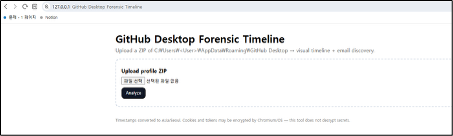
Figure 14 http://127.0.0.1:8000 을 접속한 모습
127.0.0.1:8000을 접속하면 Github Desktop 폴더를 압축한 파일을 올릴 수 있는 폼이 있다. 해당 폼에 압축된 Github Desktop 파일을 업로드 하면 분석이 진행횐다.
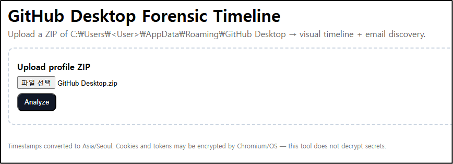
Figure 15 Github Desktop.zip 파일이 업로드 선택된 사진
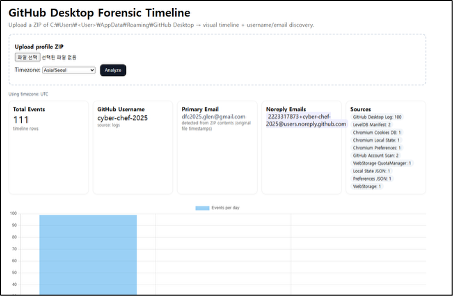
Figure 16 python을 통한 Github 사용자 식별 웹 애플리케이션 사진
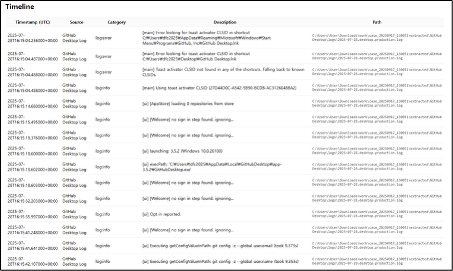
Figure 17 Timeline에서 확인 할 수 있는 정보
코드는 아래와 같으며, 사용한 데이터셋은 별첨1_Github_Desktop.zip 으로 첨부한다. 코드 또한 별첨2_Github_Timeline.py 로 첨부한다.
| import os, zipfile, json, sqlite3, re from pathlib import Path from datetime import datetime, timedelta, timezone try: from zoneinfo import ZoneInfo except Exception: ZoneInfo = None from flask import Flask, request, render_template_string, redirect, url_for APP_DIR = Path(__file__).parent UPLOADS = APP_DIR / "uploads" WORK = APP_DIR / "work" UPLOADS.mkdir(exist_ok=True) WORK.mkdir(exist_ok=True) def get_tz(tz_name: str): if ZoneInfo is not None: try: return ZoneInfo(tz_name) except Exception: pass return timezone.utc def chrome_webkit_time_to_dt(us: int, tz_name="UTC"): try: epoch = datetime(1601,1,1,tzinfo=timezone.utc) dt = epoch + timedelta(microseconds=int(us)) return dt.astimezone(get_tz(tz_name)) except Exception: return None def file_mtime(path: Path, tz_name="UTC"): try: return datetime.fromtimestamp(path.stat().st_mtime, tz=get_tz(tz_name)) except Exception: return None def add_event(events, ts, source, category, description, path=None, extra=None): if not ts: return events.append({ "timestamp": ts.isoformat() if isinstance(ts, datetime) else str(ts), "source": source, "category": category, "description": description, "path": str(path) if path else None, "extra": extra or {} }) # ---------- Parsers for extracted files ---------- def parse_desktop_logs(root: Path, events, tz_name="UTC"): log_dir = root / "logs" if not log_dir.exists(): return [] found = [] pat1 = re.compile(r"(?P<ts>\d{4}-\d{2}-\d{2}T\d{2}:\d{2}:\d{2}(?:\.\d+)?Z)\s*-\s*(?P<lvl>\w+):\s*(?P<msg>.*)") for p in sorted(log_dir.glob("*.log")): found.append(str(p)) try: with p.open("r", encoding="utf-8", errors="ignore") as f: for line in f: m = pat1.search(line) if m: ts = datetime.fromisoformat(m.group("ts").replace("Z","+00:00")).astimezone(get_tz(tz_name)) lvl = m.group("lvl"); msg = m.group("msg") add_event(events, ts, "GitHub Desktop Log", f"log:{lvl.lower()}", msg, p) else: m2 = re.search(r"\[(\d{4}-\d{2}-\d{2}T\d{2}:\d{2}:\d{2}(?:\.\d+)?Z)\]\s*(.*)", line) if m2: ts = datetime.fromisoformat(m2.group(1).replace("Z","+00:00")).astimezone(get_tz(tz_name)) msg = m2.group(2).strip() add_event(events, ts, "GitHub Desktop Log", "log:info", msg, p) except Exception as e: add_event(events, file_mtime(p, tz_name), "GitHub Desktop Log", "log:error", f"Failed to parse log: {e}", p) return found def parse_cookies(db_path: Path, events, tz_name="UTC"): out = {"dotcom_user": None, "count": 0, "domains": []} if not db_path.exists(): return out try: conn = sqlite3.connect(f"file:{db_path}?mode=ro", uri=True) cur = conn.cursor() cur.execute("SELECT name FROM sqlite_master WHERE type='table'") tables = {r[0].lower() for r in cur.fetchall()} table = "cookies" if "cookies" in tables else next(iter(tables)) if tables else None if not table: conn.close() return out cur.execute(f"PRAGMA table_info({table})") cols = {r[1]: i for i, r in enumerate(cur.fetchall())} cur.execute(f"SELECT * FROM {table}") rows = cur.fetchall() out["count"] = len(rows) domains = set() for row in rows: try: host = row[cols.get("host_key")] name = row[cols.get("name")] path = row[cols.get("path")] creation = row[cols.get("creation_utc")] last_access = row[cols.get("last_access_utc")] expires = row[cols.get("expires_utc")] domains.add(host) if name == "dotcom_user" and "github.com" in host: if "value" in cols: out["dotcom_user"] = row[cols.get("value")] ts_c = chrome_webkit_time_to_dt(creation, tz_name) ts_a = chrome_webkit_time_to_dt(last_access, tz_name) ts_e = chrome_webkit_time_to_dt(expires, tz_name) if ts_c: add_event(events, ts_c, "Chromium Cookies", "cookie:created", f"{name} @ {host}{path}", db_path) if ts_a: add_event(events, ts_a, "Chromium Cookies", "cookie:last_access", f"{name} @ {host}{path}", db_path) if ts_e and expires != 0: add_event(events, ts_e, "Chromium Cookies", "cookie:expires", f"{name} @ {host}{path}", db_path) except Exception: continue conn.close() out["domains"] = sorted(list(domains))[:50] except Exception: pass return out def parse_json_events(path: Path, source_name: str, events, tz_name="UTC"): ts = file_mtime(path, tz_name) if ts: add_event(events, ts, source_name, "file:modified", f"{source_name} modified", path) try: data = json.loads(path.read_text(encoding="utf-8", errors="ignore")) return {"keys": list(data.keys())[:50]} except Exception: return {"keys": []} def parse_quota_manager(db_path: Path, events, tz_name="UTC"): info = {"origins": 0} if not db_path.exists(): return info try: conn = sqlite3.connect(f"file:{db_path}?mode=ro", uri=True) cur = conn.cursor() cur.execute("SELECT name FROM sqlite_master WHERE type='table'") tables = {r[0].lower() for r in cur.fetchall()} for t in tables: if "origin" in t or "quota" in t or "storage" in t: try: cur.execute(f"SELECT * FROM {t} LIMIT 50") rows = cur.fetchall() info["origins"] += len(rows) except Exception: continue conn.close() mt = file_mtime(db_path, tz_name) if mt: add_event(events, mt, "WebStorage", "quota:scan", "Scanned QuotaManager.sqlite", db_path) except Exception: pass return info # ---------- Username detection in logs ---------- BAD_OWNERS = set(["login","settings","site","features","about","contact","pricing","topics","apps","marketplace","explore","issues","pulls"]) def username_from_logs(root: Path): log_dir = root / "logs" if not log_dir.exists(): return None, {} text = "" for p in sorted(log_dir.glob("*.log")): try: text += p.read_text(encoding="utf-8", errors="ignore") + "\n" except Exception: pass m = re.search(r'"login"\s*:\s*"([^"]+)"', text) if m: return m.group(1), {"method":"json_login"} m = re.search(r'\b\d+\+([A-Za-z0-9._-]+)@users\.noreply\.github\.com\b', text) if m: return m.group(1), {"method":"noreply_email"} owners = re.findall(r'github\.com[/:]([A-Za-z0-9._-]+)/[A-Za-z0-9._-]+', text) owners = [o for o in owners if o.lower() not in BAD_OWNERS] if owners: from collections import Counter cand, _ = Counter(owners).most_common(1)[0] return cand, {"method":"repo_owner"} return None, {} # ---------- Email scan DIRECTLY from ZIP (keeps original file times) ---------- EMAIL_RE = re.compile(rb'([A-Za-z0-9._%+-]+@[A-Za-z0-9.-]+\.[A-Za-z]{2,})') INCLUDE_DIRS_FOR_EMAILS = [ "logs/", "Local Storage/leveldb/", "IndexedDB/file__0.indexeddb.leveldb/", ] def detect_zip_prefix(z): for n in z.namelist(): if n.startswith("GitHub Desktop/"): return "GitHub Desktop/" return "" def scan_emails_from_zip(zip_path: Path, tz_name="UTC"): results = [] with zipfile.ZipFile(zip_path, 'r') as z: prefix = detect_zip_prefix(z) for n in z.namelist(): if n.endswith("/"): continue rel = n[len(prefix):] if n.startswith(prefix) else n if not any(rel.startswith(d) for d in INCLUDE_DIRS_FOR_EMAILS): continue try: data = z.read(n) except Exception: continue for m in EMAIL_RE.finditer(data): email = m.group(1).decode('utf-8', errors='ignore') start = max(0, m.start()-60); end = min(len(data), m.end()+60) snippet = data[start:end].decode('utf-8', errors='ignore').replace("\n"," ").strip() zi = z.getinfo(n) naive = datetime(*zi.date_time) ts = naive.replace(tzinfo=timezone.utc).astimezone(get_tz(tz_name)) score = (3 if rel.startswith("logs/") else 0) + (2 if "github" in snippet.lower() else 0) + (1 if ("account" in snippet.lower() or "login" in snippet.lower()) else 0) results.append({"email": email, "file": rel, "file_modified": ts.isoformat(), "snippet": snippet, "score": score}) events = [] for r in results: cat = "account:noreply_email" if "users.noreply.github.com" in r["email"] else "account:primary_email" events.append({"timestamp": r["file_modified"], "source": "GitHub Account Scan", "category": cat, "description": r["email"], "path": r["file"], "extra": {"score": r["score"]}}) from collections import defaultdict agg = defaultdict(int) for r in results: agg[r["email"]] += 1 primary = None; noreplies = [] for em, _ in sorted(agg.items(), key=lambda x: -x[1]): if "users.noreply.github.com" in em: noreplies.append(em) elif primary is None: primary = em return {"hits": results, "events": events, "primary_email": primary, "noreply_emails": sorted(list(set(noreplies)))} # ---------- FS presence markers DIRECTLY from ZIP (generalized, no hardcoded dates) ---------- def scan_fs_markers_from_zip(zip_path: Path, tz_name="UTC"): """Emit presence markers for key artefacts using ZIP entry timestamps. No hardcoded filenames.""" markers = [] with zipfile.ZipFile(zip_path, 'r') as z: prefix = detect_zip_prefix(z) interesting = [ ("Network/Cookies", "Chromium Cookies DB"), ("Preferences", "Chromium Preferences"), ("Local State", "Chromium Local State"), ("WebStorage/QuotaManager", "WebStorage QuotaManager"), ] # Any log files for n in z.namelist(): if not n.endswith(".log"): continue rel = n[len(prefix):] if n.startswith(prefix) else n if not rel.startswith("logs/"): continue zi = z.getinfo(n) naive = datetime(*zi.date_time) ts = naive.replace(tzinfo=timezone.utc).astimezone(get_tz(tz_name)) markers.append({"timestamp": ts.isoformat(), "source": "GitHub Desktop Log", "category": "file:present", "description": "log present", "path": rel}) # Specific important files for rel, label in interesting: n = prefix + rel if prefix else rel try: zi = z.getinfo(n) naive = datetime(*zi.date_time) ts = naive.replace(tzinfo=timezone.utc).astimezone(get_tz(tz_name)) markers.append({"timestamp": ts.isoformat(), "source": label, "category": "file:present", "description": f"{label} present", "path": rel}) except KeyError: pass # MANIFESTs for n in z.namelist(): if n.endswith("/"): continue rel = n[len(prefix):] if n.startswith(prefix) else n if "MANIFEST" in rel and ("leveldb" in rel.lower() or "IndexedDB" in rel): zi = z.getinfo(n) naive = datetime(*zi.date_time) ts = naive.replace(tzinfo=timezone.utc).astimezone(get_tz(tz_name)) markers.append({"timestamp": ts.isoformat(), "source": "LevelDB Manifest", "category": "file:present", "description": "LevelDB manifest present", "path": rel}) return markers # ---------- Core analysis ---------- def analyze_zip(zip_path: Path, tz_name="UTC"): work_dir = WORK / f"case_{datetime.now().strftime('%Y%m%d_%H%M%S')}" extract_dir = work_dir / "extracted" extract_dir.mkdir(parents=True, exist_ok=True) with zipfile.ZipFile(zip_path, 'r') as z: z.extractall(extract_dir) root = extract_dir if (extract_dir / "GitHub Desktop").exists(): root = extract_dir / "GitHub Desktop" events = [] parse_desktop_logs(root, events, tz_name=tz_name) ck = parse_cookies(root / "Network" / "Cookies", events, tz_name=tz_name) parse_json_events(root / "Preferences", "Preferences JSON", events, tz_name=tz_name) parse_json_events(root / "Local State", "Local State JSON", events, tz_name=tz_name) parse_quota_manager(root / "WebStorage" / "QuotaManager", events, tz_name=tz_name) # Username from logs gh_user, user_meta = username_from_logs(root) # Email + generalized FS markers from ZIP email_info = scan_emails_from_zip(zip_path, tz_name=tz_name) fs_markers = scan_fs_markers_from_zip(zip_path, tz_name=tz_name) events.extend(email_info["events"]) events.extend(fs_markers) # sort + summarize events = [e for e in events if e.get("timestamp")] events.sort(key=lambda e: e["timestamp"]) from collections import Counter counts = dict(Counter(e["source"] for e in events)) username = gh_user or (ck.get("dotcom_user") if isinstance(ck, dict) else None) summary = { "events": len(events), "github_username": username, "github_username_source": "logs" if gh_user else ("cookie" if username else None), "cookie_domains": ck.get("domains", []) if isinstance(ck, dict) else [], "counts": counts, "primary_email": email_info.get("primary_email"), "noreply_emails": email_info.get("noreply_emails", []), "tz": tz_name, } return root, events, summary, work_dir # ---------- UI ---------- HTML = """ <!doctype html> <html> <head> <meta charset="utf-8"> <title>GitHub Desktop Forensic Timeline</title> <meta name="viewport" content="width=device-width, initial-scale=1" /> <style> body { font-family: system-ui, -apple-system, Segoe UI, Roboto, sans-serif; margin: 24px; } h1 { margin-bottom: 0; } .meta { color: #666; margin: 4px 0 16px; } .container { max-width: 1200px; margin: auto; } .upload { border: 2px dashed #cbd5e1; border-radius: 12px; padding: 16px; margin: 16px 0; } .cards { display:grid; grid-template-columns: repeat(auto-fit,minmax(220px,1fr)); gap: 12px; margin: 12px 0 24px; } .card { border: 1px solid #eee; border-radius: 12px; padding: 12px; box-shadow: 0 1px 4px rgba(0,0,0,.04); } .muted { color:#666; font-size: 12px; } .tag { display:inline-block; background:#f1f5f9; padding:2px 8px; border-radius:999px; font-size: 12px; margin-right:4px; } table { width: 100%; border-collapse: collapse; } th, td { padding: 8px; border-bottom: 1px solid #eee; font-size: 14px; } th { background: #fafafa; position: sticky; top: 0; } .path { color:#555; font-family: ui-monospace, SFMono-Regular, Menlo, Consolas, monospace; font-size: 12px; } .footer { margin-top: 32px; color:#777; font-size: 12px; } .btn { display:inline-block; padding:8px 12px; background:#111827; color:#fff; border-radius:10px; text-decoration:none; } .row { margin: 8px 0; } .pill { background:#eef; padding:2px 6px; border-radius:8px; } .subtle { color:#334155; } .tz { font-size: 12px; color:#475569; } </style> </head> <body> <div class="container"> <h1>GitHub Desktop Forensic Timeline</h1> <div class="meta">Upload a ZIP of C:\\Users\\<User>\\AppData\\Roaming\\GitHub Desktop → visual timeline + username/email discovery.</div> <div class="upload"> <form method="POST" enctype="multipart/form-data"> <div class="row"><strong>Upload profile ZIP</strong></div> <div class="row"><input type="file" name="zipfile" required /></div> <div class="row">Timezone: <select name="tz"> <option value="Asia/Seoul">Asia/Seoul</option> <option value="UTC">UTC</option> <option value="America/Los_Angeles">America/Los_Angeles</option> <option value="Europe/London">Europe/London</option> </select> <button class="btn" style="margin-left:8px;">Analyze</button> </div> </form> </div> {% if summary %} <div class="tz">Using timezone: {{ summary.tz }}</div> <div class="cards"> <div class="card"> <div><strong>Total Events</strong></div> <div style="font-size:28px;">{{ summary.events }}</div> <div class="muted">timeline rows</div> </div> <div class="card"> <div><strong>GitHub Username</strong></div> <div style="font-size:20px;">{{ summary.github_username or "<span class='muted'>not found</span>" | safe }}</div> <div class="muted">source: {{ summary.github_username_source or "n/a" }}</div> </div> <div class="card"> <div><strong>Primary Email</strong></div> <div class="subtle" style="font-size:16px;">{{ summary.primary_email or "<span class='muted'>not found</span>" | safe }}</div> <div class="muted">detected from ZIP contents (original file timestamps)</div> </div> <div class="card"> <div><strong>Noreply Emails</strong></div> <div>{% if summary.noreply_emails %}{% for d in summary.noreply_emails[:4] %}<span class="pill">{{ d }}</span> {% endfor %}{% else %}<span class="muted">none</span>{% endif %}</div> </div> <div class="card"> <div><strong>Sources</strong></div> <div>{% for k,v in summary.counts.items() %}<span class="tag">{{k}}: {{v}}</span>{% endfor %}</div> </div> </div> <canvas id="eventsPerDay" height="100"></canvas> <h2>Timeline</h2> <table> <thead><tr><th>Timestamp ({{ summary.tz }})</th><th>Source</th><th>Category</th><th>Description</th><th>Path</th></tr></thead> <tbody> {% for e in events %} <tr> <td>{{ e.timestamp }}</td> <td>{{ e.source }}</td> <td>{{ e.category }}</td> <td>{{ e.description }}</td> <td class="path">{{ e.path }}</td> </tr> {% endfor %} </tbody> </table> {% endif %} <div class="footer">FS markers are generalized and use ZIP entry times (no hardcoded dates, better across samples).</div> </div> {% if events %} <script> const events = {{ events|tojson }}; const counts = {}; for (const e of events) { const d = e.timestamp.slice(0,10); counts[d] = (counts[d] || 0) + 1; } const labels = Object.keys(counts).sort(); const data = labels.map(k => counts[k]); new Chart(document.getElementById('eventsPerDay').getContext('2d'), { type: 'bar', data: { labels, datasets: [{ label: 'Events per day', data }] }, options: { responsive: true, scales: { x: { ticks: { autoSkip: true, maxRotation: 0 }}}} }); </script> {% endif %} </body> </html> """ app = Flask(__name__) @app.route("/", methods=["GET","POST"]) def index(): if request.method == "POST": f = request.files.get("zipfile") tz = request.form.get("tz", "UTC") if not f: return "No file", 400 save_path = UPLOADS / f.filename f.save(save_path) return redirect(url_for("case", filename=f.filename, tz=tz)) return render_template_string(HTML, summary=None, events=None) @app.route("/case/<filename>") def case(filename): tz = request.args.get("tz", "UTC") zip_path = UPLOADS / filename if not zip_path.exists(): return "Not found", 404 root, events, summary, _ = analyze_zip(zip_path, tz_name=tz) return render_template_string(HTML, summary=type("Obj",(object,),summary), events=events) if __name__ == "__main__": app.run(host="0.0.0.0", port=8000, debug=False) |
Table 23 바이브 코딩을 통한 타임라인 분석 소스코드
'Forensics > DFC' 카테고리의 다른 글
| [2025 DFC] 2025 디지털포렌식 챌린지 - 301 - 404 VMK Not Found (0) | 2026.04.20 |
|---|---|
| [2025 DFC] 2025 디지털포렌식 챌린지 - 207 – iBackup Trace (0) | 2026.04.20 |
| [2025 DFC] 2025 디지털포렌식 챌린지 - 203 - Ooops, your files have ben encrypted! (0) | 2026.04.20 |
| [2025 DFC] 2025 디지털포렌식 챌린지 - 201 - Look at the Quote (1) | 2026.04.20 |
| [2021 DFC] 2021 디지털포렌식 챌린지 - 301 - What is the secret information (4) | 2021.10.29 |