[2025 DFC] 2025 디지털포렌식 챌린지 - 301 - 404 VMK Not Found
| Step-by-step methodology: |
문제풀이에 앞서 MD5 해시값 검증을 진행한다.
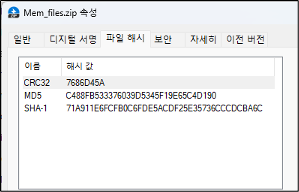
그림 1 Mem_files.zip 파일 해시 검증
문제에서 주어진 Mem_files.zip의 MD5 해시값이 C488FB533376039D5345F19E65C4D190과 동일한것을 확인했다.
문제에서 주어진 이미지 파일인 diskimg 파일의 정보는 다음과 같다.
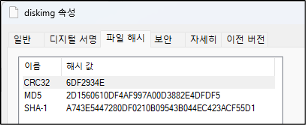
그림 2 diskimg 파일의 해시 정보
| File Name | diskimg |
| File Size | 1,048,576,000 바이트 |
| MD5 | 2D1560610DF4AF997A00D3882E4DFDF5 |
| SHA1 | A743E5447280DF0210B09543B044EC423ACF55D1 |
표 1 diskimg 파일의 정보
해당 파일을 HxD를 통해 확인하면 다음과 같다.
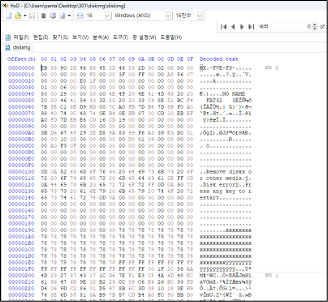
그림 3 HxD를 통해 확인한 diskimg 파일
HxD를 통해 확인한 결과, FVE-FS 라는 시그니처를 확인 할 수 있으며, 이는 BitLocker 암호화 볼륨의 메타데이터 시그니처이다. BitLocker로 보호되는 드라이브의 시작 부분(메타데이터 영역)에 기록되는 특징을 가지고 있다.
diskimg 파일을 인식시키기 위해 아스날 이미지 마운터를 사용하였으며 아래는 diskimg파일를 논리적으로 인식시키는 과정이다.
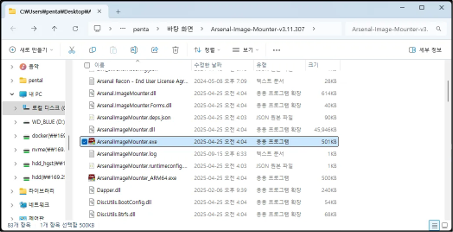
그림 4 ARSENAL IMAGE MOUNTER의 포터플 파일 폴더

그림 5 ARSENAL IMAGE MOUNTER의 실행화면
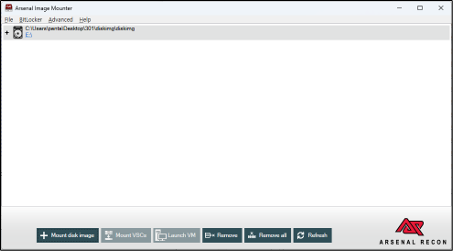
그림 6 diskimg 파일을 탑재한 모습
아스날 이미지 마운터 (ARSENAL IMAGE MOUNTER)을 통해 diskimg를 탑재 후 파일 탐색기를 통해 이미지가 정상적으로 마운트 된 것을 확인 할 수 있다.
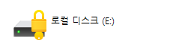
그림 7 파일탐색기를 통해 확인한 이미지파일 인식 확인
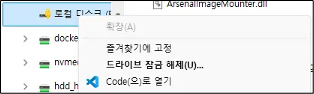
그림 8 디스크 우 클릭 후 메뉴 일부
탑재한 결과 비트라커로 암호화된 디스크 1개를 확인 할 수 있다. 비트라커 암호화 키를 확인하기 위해서 메모리 분석을 진행한다.
Mem_files.zip 파일을 압축 해제하면 다음 그림과 같이 6개의 메모리 덤프파일을 확인할 수 있다.

그림 9 Mem_files.zip의 압축해제 후 파일 목록
해당 파일은 메모리 덤프 파일이며 cat 명령어를 통해서 6개로 나뉘어져 있는 파일을 모두 통합한다.
| pental@pentalui-MacBookAir Mem_files % cat mempart00.bin mempart01.bin mempart02.bin mempart03.bin mempart04.bin mempart05.bin > memory.dmp |
표 2 메모리 파일을 통합하기 위해 사용한 명령어
비트라커(BitLocker) 복구키(Recovery Key) 는 Windows에서 드라이브 암호화를 해제하거나, 정상적인 인증 절차로는 접근할 수 없을 때 데이터를 복구하기 위해 사용하는 특수한 48자리 숫자 암호이다. 복구키의 경우 6자리 숫자가 8개의 그룹 형태를 나타내고 있으며 예시는 다음과 같다.
| 123456-123456-123456-123456-123456-123456-123456-123456 |
표 3 비트라커 복구키의 예시
합쳐진 memory 덤프 파일에서 strings 및 정규식을 통해 Bitlocker 복구키와 관련된 증거를 확보한다.
| strings memory.dmp | grep -E "[0-9]{6}-[0-9]{6}-[0-9]{6}-[0-9]{6}-[0-9]{6}-[0-9]{6}-[0-9]{6}-[0-9]{6}" |
표 4 정규식을 통한 복구키 파싱 명령어
위 명령을 수행한 결과 아래와 같은 복구키를 확인 할 수 있다.
| played by your PC, then use the following key to unlock your drive. Recovery Key: 322839-683573-358259-411290-335368-358182-335566-709874 If the above identifier doesn't match the one displayed by your PC, then this isn't the right key to unlock your drive. Try another recovery key, or refer to https://go.microsoft.com/fwlink/?LinkID=260589 for additional assistance. entifier matches the one displayed by your PC, then use the following key to unlock your drive. Recovery Key: 060896-522335-394207-442046-104115-373010-632456-443289 If the above identifier doesn't match the one displayed by your PC, then this isn't the right key to unlock your drive. Try another recovery key, or refer to https://go.microsoft.com/fwlink/?LinkID=260589 for additional assistance. 8FE0955C If the above identifier matches the one displayed by your PC, then use the following key to unlock your drive. Recovery Key: 322839-683573-358259-411290-335368-358182-335566-709874 If the above identifier doesn't match the one displayed by your PC, then this isn't the right key to unlock your drive. Try another recovery key, or refer to https://go.microsoft.com/fwlink/?LinkID=260589 for additional assistance. To verify that this is the correct recovery key, compare the start of the following identifier with the identifier value displayed on your PC. Identifier: 1088859C-680D-45C7-9376-7C228FE0955C If the above identifier matches the one displayed by your PC, then use the following key to unlock your drive. Recovery Key: 322839-683573-358259-411290-335368-358182-335566-709874 If the above identifier doesn't match the one displayed by your PC, then this isn't the right key to unlock your drive. Try another recovery key, or refer to https://go.microsoft.com/fwlink/?LinkID=260589 for additional assistance. BitLocker Drive Encryption recovery key To verify that this is the correct recovery key, compare the start of the following identifier with the identifier value displayed on your PC. Identifier: 1088859C-680D-45C7-9376-7C228FE0955C If the above identifier matches the one displayed by your PC, then use the following key to unlock your drive. Recovery Key: 322839-683573-358259-411290-335368-358182-335566-709874 If the above identifier doesn't match the one displayed by your PC, then this isn't the right key to unlock your drive. Try another recovery key, or refer to https://go.microsoft.com/fwlink/?LinkID=260589 for additional assistance. BitLocker Drive Encryption recovery key To verify that this is the correct recovery key, compare the start of the following identifier with the identifier value displayed on your PC. Identifier: 91442E6D-8B2B-42F0-84F7-A844A6C15290 If the above identifier matches the one displayed by your PC, then use the following key to unlock your drive. Recovery Key: 060896-522335-394207-442046-104115-373010-632456-443289 If the above identifier doesn't match the one displayed by your PC, then this isn't the right key to unlock your driv BitLocker Drive Encryption recovery key To verify that this is the correct recovery key, compare the start of the following identifier with the identifier value displayed on your PC. Identifier: 1088859C-680D-45C7-9376-7C228FE0955C If the above identifier matches the one displayed by your PC, then use the following key to unlock your drive. Recovery Key: 322839-683573-358259-411290-335368-358182-335566-709874 If the above identifier doesn't match the one displayed by your PC, then this isn't the right key to unlock your drive. Try another recovery key, or refer to https://go.microsoft.com/fwlink/?LinkID=260589 for additional assistance. |
표 5 표 4의 실행 결과
위 결과를 종합적으로 분석한 결과 2개의 복구키를 확인 할 수 있다.
| Identifier | Recovery Key |
| 1088859C-680D-45C7-9376-7C228FE0955C | 322839-683573-358259-411290-335368-358182-335566-709874 |
| 91442E6D-8B2B-42F0-84F7-A844A6C15290 | 060896-522335-394207-442046-104115-373010-632456-443289 |
표 6 정규식을 통해 추출한 복구키 정보
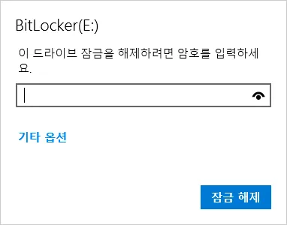
그림 10 비트라커 디스크 잠금 해제 과정
비트라커의 경우 드라이브 암호를 알지 못하는 경우 기타 옵션을 통해 복구키를 입력 할 수 있다.
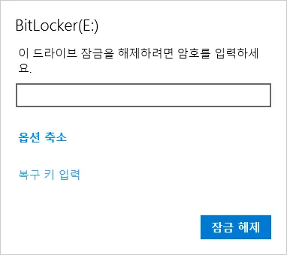
그림 11 기타 옵션을 클릭 한 후 모습
복구 키 입력 버튼을 클릭하면 해당 디스크의 키 ID를 확인 할 수 있다.
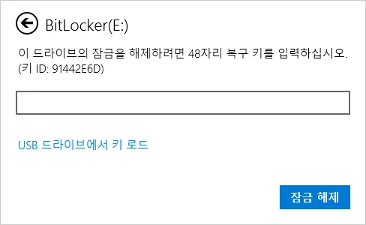
그림 12 복구 키 입력을 클릭 한 후 확인되는 식별자 ID
위 그림에서 확인 할 수 있듯이 키 ID가 91442E6D임을 나타내고 있으며, 이 키는 메모리 덤프 파일에서 정규식을 통해 추출한 결과에서 동일한 8자리 식별자를 확인 할 수 있다.
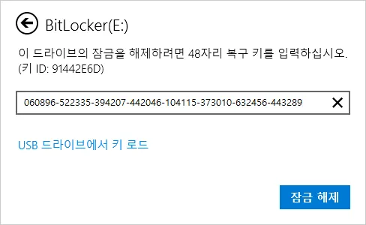
그림 13 추출한 복구키를 입력한 모습
따라서 표 6을 참고하여 91442E6D 키 ID를 가진 Recovery Key를 입력한다.
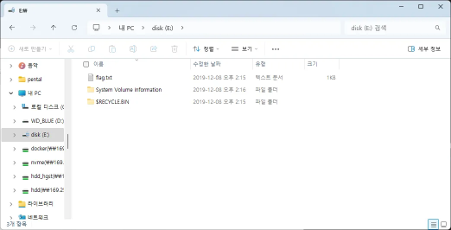
그림 14 비트라커가 해제된 모습
정상적으로 비트라커가 해제되었으며 해당 디스크에서는 flag.txt 파일을 확인 할 수 있다.
flag.txt 파일의 정보는 다음과 같다.
| File Name | flag.txt |
| File Size | 20 바이트 |
| MD5 | BDEA960F1BC2F21D8CF3579D44DD0FED |
| SHA1 | 29492F034EDF0EFA5553305779752868C2989697 |
표 7 flag.txt 파일 정보
윈도우 기본 프로그램인 메모장을 통해 flag.txt 파일을 열어본 결과는 다음과 같다.
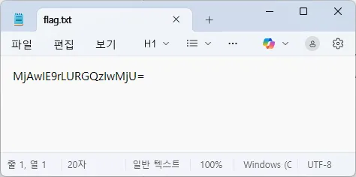
그림 15 flag.txt 에 담겨져 있는 내용
Base64로 인코딩 된 결과를 확인 할 수 있으며 복호화 하기 위해서 base64decode.org 온라인 도구를 사용하였다. (https://base64decode.org)
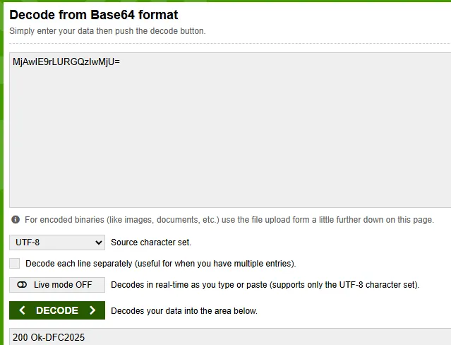
그림 16 base64 복호화 모습
복호화 결과 200 Ok-DFC2025 라는 값을 얻을 수 있다.
답 : 200 Ok-DFC2025
'Forensics > DFC' 카테고리의 다른 글
| [2025 DFC] 2025 디지털포렌식 챌린지 - 207 – iBackup Trace (1) | 2026.04.20 |
|---|---|
| [2025 DFC] 2025 디지털포렌식 챌린지 - 206 – Let’s Vibe (0) | 2026.04.20 |
| [2025 DFC] 2025 디지털포렌식 챌린지 - 203 - Ooops, your files have ben encrypted! (0) | 2026.04.20 |
| [2025 DFC] 2025 디지털포렌식 챌린지 - 201 - Look at the Quote (1) | 2026.04.20 |
| [2021 DFC] 2021 디지털포렌식 챌린지 - 301 - What is the secret information (4) | 2021.10.29 |